
The Rationale Blog
Rationale Newsletter April 2016
10 years ago
In this issue of the Rationale Newsletter:
- Spanish Tutorials online
- New features in Rationale
- Research snippets
- Customer feedback
Spanish Tutorials
Now online: the Spanish version of all three tutorials in Rationale. Thank you, David Montoya & Gissella Mejia of Translation Boutique, for your work!
Please let Spanish speaking educators in your network know that Rationale is now also available to Spanish speaking students.
Let us know if you have suggestions for corrections or improvements to the available translations.
New features:
- Turkish maps: when you choose Turkish as a language you can use Turkish logical indicators.
- We added 'Recent documents' to the Rationale editor: open recently used maps with one mouse click in your editor (no need to open your My maps): go to File / Open../ Recent documents.
Research snippets:
About religion & critical thinking: Atheists and Agnostics Are More Reflective than Religious Believers: Four Empirical Studies and a Meta-Analysis.
'Does Mindfullness Enhance Critical Thinking?' A post of Michael Hogan in Psychology Today.
Another post of Michael Hogan may be of special interest: Critical Thinking and Real-World Outcomes: 'Critical thinking is critical for life success.'
Customer Feedback:
Matthew Rappel (Hong Kong Island IS): 'Rationale is exactly what is needed for the IB - ATL program because you can develop these skills with Rationale in an integrated way in a whole curriculum’.
When you have suggestions for interesting posts, please let us know.
The Rationale team
Argument mapping with paper & pencil or Rationale?
There is abundant empirical evidence that argument mapping (AM) really can work for developing critical thinking skills ( why 'can'? : you need to exercise a lot and receive timely, good-quality feedback).
As Tim van Gelder writes in this review of empirical research on the impact of AM instruction:
“Indeed, at this stage it seems fair to say that high-intensity AM-based instruction is one of the most effective techniques we know for accelerating CT skill gains in higher education.”
Maralee Harrell noted in her paper No Computer Program Required: Even Pencil-and-Paper Argument Mapping Improves Critical Thinking Skills (2008), that you can map arguments using paper & pencil or software.
She wrote:
‘’To my knowledge there has been no research to determine whether the crucial factor is the mere ability to construct argument maps, or the aid of a computer platform and tutor, or possibly both.’’
In the online journal Education Technology Research & Development of February 2016 Maryam Eftekhari , Elaheh Sotoudehnama and S. Susan Marandi (English Language Department, Alzahra University, Tehran, Iran) just published a research paper in which they try to answer this question, using Rationale.
Their conclusion: ‘’Results suggested that students in the software group significantly outperformed those in the paper and pencil group on overall CCTST and the sub-skills of inference and inductive reasoning. They also scored significantly higher on all tests compared to the comparison group.’’
For their paper see here.
Collaboration in Rationale: some tips
11 years ago
The Collaboration function in Rationale Extra allows users to share maps with other users with one mouse click. More information on this option you can find in our new Rationale Help here. In addition here under some tips on how to use this function.
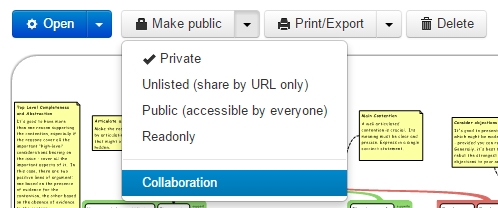
To share a map you first need to choose the Collaboration option you see when you open a map in your My Maps:
You can share a map with other users by inserting their username or email address:
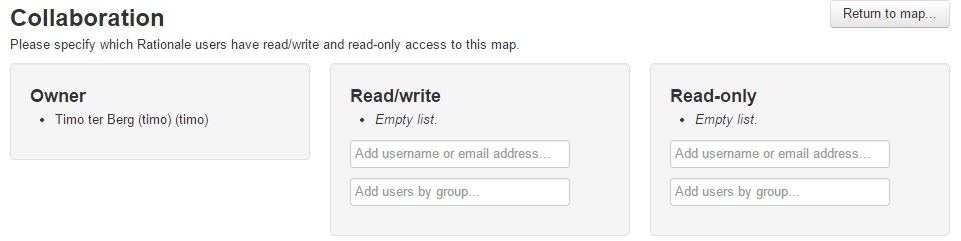
You can use an email address only when the owner has given permission to do so in his/her My Profile by ticking the option: 'Email is Public?'
Only when 'Notifications?' in your My Profile its ticked, you will receive an email notification that someone has shared a map with you.
When you want to share a map with a group of people you can do so by first making a group here:
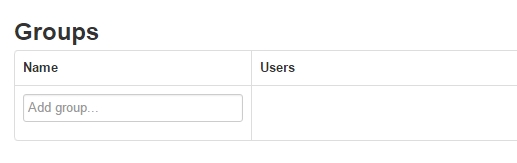
First type the name of a group and give [Enter]. Next, copy/paste the usernames or email addresses of your group members, comma separated and give [Enter]. Finally, add the name of the group in the box at the top and give [Enter].
When you want to share a map with e.g. a class of students by using people's email addresses, make sure you have the email addresses that are connected to the accounts of the group members and they have ticked the option 'Email is Public'.
When you share a map you can choose between 'Read/write' and 'Read-only'.
The difference between Read-only as a separate option and Read-only within Collaboration is that a map with the status Read-only can be seen by everyone with the url/link. A map with the status Collaboration-Read-only can only be read by people/groups that are connected to this map; so this option is more safe.
When someone has shared a map with you, you will see the map in the folder 'Shared with me' in your My Maps.
The owner of the map has control. So, when he/she decides to stop sharing it with you, you will have no access any longer.
The Revision History of the map is available to all with whom the map is shared.
When you are a lecturer and ask your students to share maps with you, make sure that you have communicated the way they should name their maps. E.g. a combination of their own name, name of the assignment and version.
Each change that is made in a map is visible for the other members of the group when they refresh their editor (F5). There is a chance that two changes being made at exactly the same time in a map will not be saved both, so some coordination - e.g. by Skype - is asked for especially when you are working with a bigger group. This will be solved when real-time working together is available late this year.
Giving feedback on a shared map can be done on several ways: click on a box and add a note (Ctrl+A), click on the screen and type your text in a box, or add a Comment in the tab in the Text Panel.
We will post a link to this blog post in the Forum too so that other tips on how to use Collaboration can be shared there.
The Rationale Team